OneNoteGem OneNote Search Bar v6.3.0.33 File size: 14 MB
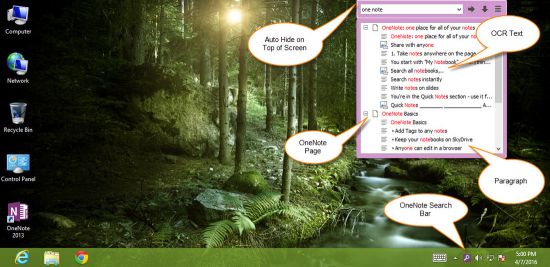
OneNote Search Bar auto hide on top of screen, search and list paragraphs, image OCR text, handwriting inks without running OneNote. Search notebook saved on OneDrive.
Features
Search and List Pages Search pages in OneNote, and list pages.
Search and List Paragraphs Search and list paragraphs and highlight the keyword.
Search and List Paragraphs with Tag Icons If search result is a tag paragraph, "Search Bar" list this paragraph with its tag icon.
Search and List Paragraphs with Heading Icons If search result is a heading paragraph, "Search Bar" list this paragraph with heading icon ( 1 - 6 ).
Search and List Image OCR Text Search and list image OCR text.
List all Unindexed Pages List all the unindexed pages in OneNote notebooks.
Hide/Show Search Bar to Top of Screen Hide Search Bar on Top of Screen Move mouse over the top of input box of Search Bar, the Search Bar will hide on top of screen. Show Search Bar on Top of Screen It leaves the bottom white line on top of screen when then search bar is hidden. Move mouse over the white line, the search bar will show again.
Whats New Updates: official site does not provide any info about changes in this version
Уважаемый посетитель, Вы зашли на сайт как незарегистрированный пользователь. Мы рекомендуем Вам зарегистрироваться либо войти на сайт под своим именем.